


Soccer Tips - Scouter
4.837.00 Reviews
App Specs
- Version
- 1.4.23
- Updated On
- License
- Free
- Downloads
- 500,000+
- Developer
- Artlines Web Solutions
- Categories
- Sports
- Platform
- Android, iOS
Screenshots
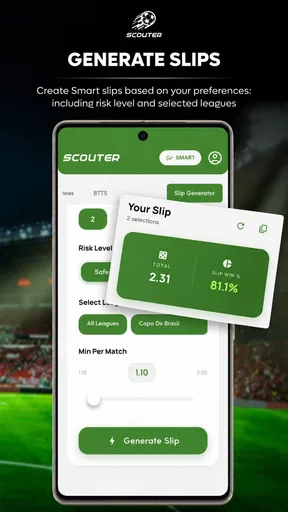
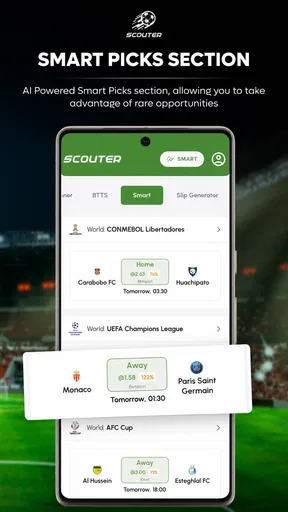
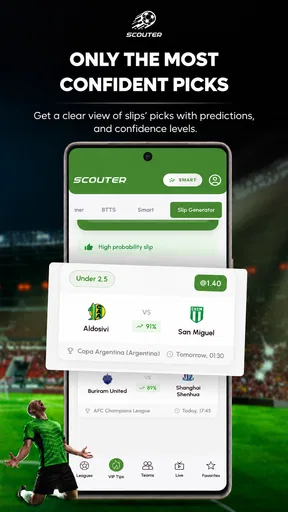
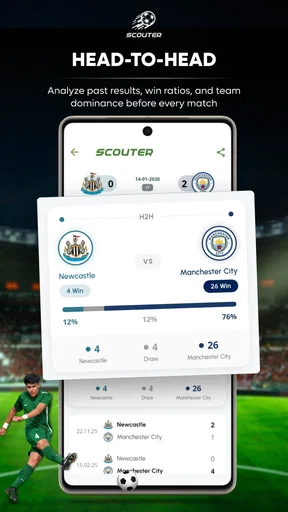
 Analysis by AppCompare
If you're a soccer enthusiast like me, then you've probably found yourself knee-deep in stats, player analyses, and team strategies. Enter Soccer Tips - Scouter, an app that promises to be your ultimate guide in the world of soccer. But is it really the game-changer it claims to be? Let's dive in and find out.
Checking a fixture without getting lost in the numbers
I find a scores-and-statistics app most useful when I have a particular question, not when I am trying to read every number on a screen. Before a match, I might want to check how a team has been doing; during the game, I may only need a quick score check. The practical way to use Soccer Tips - Scouter is to decide what you want to learn first, then treat its tips and statistics as supporting context rather than a verdict on what will happen.
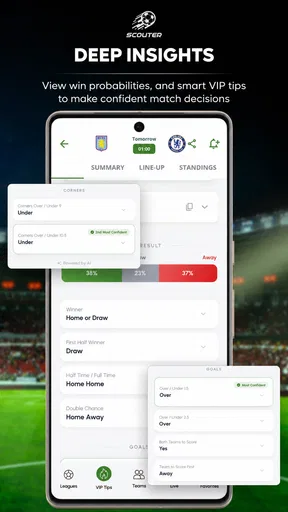
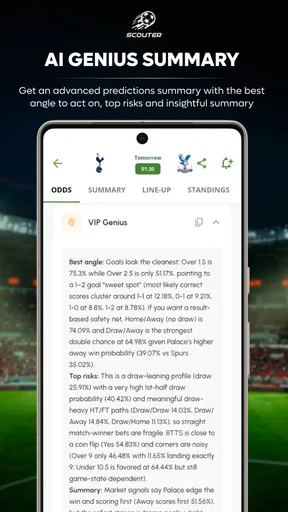
That distinction matters because sports predictions are uncertain by nature. An AI-generated tip can help me notice a possibility or organize my thinking, but it cannot remove the unpredictability of a match. I would not use a tip as a reason to assume a result is guaranteed, and I would be especially cautious about making financial decisions based on it. For a fan, the value is in having another angle to consider, not in being promised a winning outcome.
Getting Started with Soccer Tips - Scouter
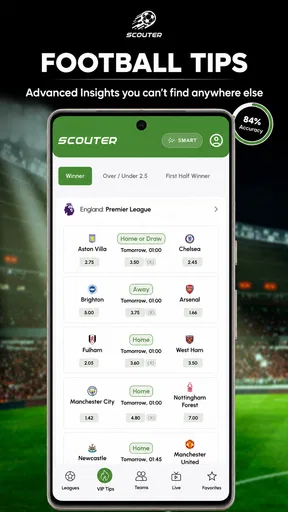
First things first, installing Soccer Tips - Scouter was a breeze. Available on both Android and iOS, it took no time to download and set up. The interface is slick and user-friendly, which is always a win in my book. As soon as you open the app, you're greeted with a dashboard that's both intuitive and visually appealing.
It is a free sports app from Artlines Web Solutions, with optional in-app purchases ranging from $1.49 to $99.99 per item. I would start with the free experience and only consider a purchase after checking exactly what it offers and whether I would use it regularly. The app is rated for Everyone, has a 4.7 average from around 16,000 ratings, and has passed 500,000 installs. It runs on Android 7.0 or later, and version 1.3.57 is the current release.
Features That Stand Out
The app is packed with features that cater to both casual fans and hardcore soccer analysts. One of the coolest features is the real-time match analysis. You get updates and insights as the game unfolds, which is perfect if you're juggling multiple matches. It’s like having a personal commentator in your pocket.
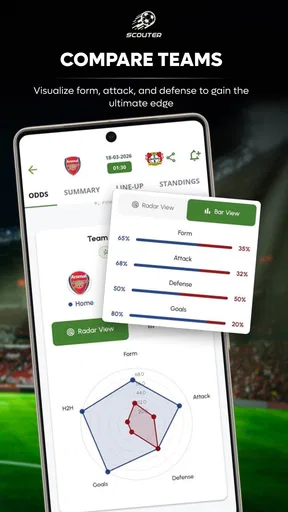
Another feature that caught my eye is the team strategy breakdown. It provides detailed insights into team formations, player roles, and tactical adjustments. Whether you're a coach looking to improve your team's performance or just a fan trying to understand the game better, this feature is gold.
Worth Reading Before You Choose

Flipboard Shows What News Apps Must Do Beyond the Feed

Switching to Android Auto Means Rethinking Your Driving Routine

Google Calendar Makes a Crowded Week Easier to Manage

Ludo King Makes the Most of the Minutes Between Plans

Baby Panda World Brings Quick Play to Modern Phones, but Its Game Library Feels Busy

ESPN’s Live Game View Makes Following Close Games Easier
For a more grounded routine, I would use the app in two passes: first, look at the match information before kickoff, then return during play only if a score or developing situation genuinely matters to me. That keeps a stream of statistics from turning into noise. If I am watching one match closely, I can use the app to follow another fixture without switching between several general sports feeds; if I am focused on the broadcast, I can leave the phone aside and check later.
There is a useful trade-off here. A compact tip can be quicker to interpret than raw match data, while a fan who wants to build their own tactical picture may prefer to compare details and make their own judgment. I would treat the AI tips as a starting point for questions—what might explain this prediction, and what would change my view?—rather than as a replacement for watching the game or understanding the teams.
User Experience
Using the app is as smooth as a Ronaldo dribble. The navigation is straightforward, and everything is where you'd expect it to be. The developers have done a stellar job in ensuring that even those who aren't tech-savvy can easily find their way around. I particularly appreciated the notifications feature, which can be customized to alert you about specific teams, players, or matches.
For readability, I would judge any statistics screen by whether I can pick out the one detail I came for without having to scan every item. That is especially useful on a small phone when the match is already on television or when I am checking in between other tasks. If a screen feels busy, narrowing my attention to one team or fixture is a better approach than trying to follow every available number at once.
Notifications are most helpful when they answer a clear need. I would choose only the teams, players, or matches I genuinely follow, rather than allowing every possible alert to interrupt the day. This is a simple way to keep match updates useful in a work break or on the journey home, while avoiding the feeling that the app is competing with the match itself for attention.
One minor hiccup, though, was the occasional lag during peak match times. It’s not a deal-breaker, but it did disrupt the experience a tad. However, the developers seem proactive with updates, so I'm hopeful this will be ironed out soon.
Using it across different situations
For a realistic everyday example, imagine I am on the bus home while a match I care about is underway. I can check the score and the available match context during a quiet moment, then put the phone away before my stop. That is a better fit than trying to study every statistic while moving through a crowded station. At home, with more time, I can revisit the same fixture and use the information to follow the tactical story rather than glance only at the score.
That flexibility is a strength, but it does not make the app equally comfortable in every setting. A bright outdoor environment, a noisy venue, limited time, or the need to keep attention on surroundings can all make extended reading impractical. I would use brief checks in those moments and save deeper comparison for when I can concentrate. Anyone who needs very large text, screen-reader-specific support, or extensive display customization should test the app on their own device before relying on it; I would not assume those needs are covered just because the general navigation feels approachable.
The app is a better match for fans who enjoy following fixtures and using statistics to add context, including people who like to compare a tip with their own view of the game. Someone who only wants the fastest possible score alert may find a basic live-score service simpler. A reader seeking long-form reporting, broadcast commentary, or a full coaching analysis workflow may be better served by a dedicated alternative in that area. Soccer Tips - Scouter sits between a bare score screen and deeper specialist analysis, so its appeal depends on whether that middle ground is what you want.
Community and Interaction
One of the aspects I loved about the app is the community interaction. You can engage with other soccer fans, share tips, and even predict match outcomes. It adds a social element to the app, making it more than just a tool—it's a gathering place for fans worldwide.
The app also offers a discussion forum, where you can dive into debates about recent matches, player performances, and upcoming fixtures. It's an excellent way to connect with like-minded individuals and get diverse perspectives.
I would use the social side selectively. Reading different interpretations can make a match more interesting, but a lively debate is not the same as reliable analysis. If I want to understand why another fan disagrees with a prediction, discussion can be valuable; if I need a quick score or a quiet, distraction-free check, the forum is easy to leave for another time. Keeping those purposes separate helps the community add perspective without taking over the experience.
Why You Should Try It
In the crowded space of sports apps, Soccer Tips - Scouter holds its ground with its comprehensive features and user-friendly interface. It's not just another app; it's a companion for every soccer fan. Whether you're watching a local derby or an international showdown, this app enriches your experience with insights and interactions.
It’s ideal for anyone looking to deepen their understanding of the game or simply keep up with the latest in the soccer world. So if you haven't already, give it a whirl. Who knows, it might just become your go-to soccer app!
My main advice is to decide what role you want it to play before you build a habit around it. If you enjoy predictions, compare them with what you already know about a fixture; if you mainly follow live action, use the score and statistics as occasional context. That makes the app more useful than treating every tip as equally important, and it gives you a clear way to tell whether the extra information is worth keeping on your phone.
For anyone weighing a paid item, the sensible question is not simply whether it sounds interesting, but whether it solves a specific need that comes up often. I would check the purchase details in the app and avoid paying on the assumption that an optional feature will guarantee better predictions or results. The free entry point makes it possible to decide whether the style of information suits you first.
All in all, Soccer Tips - Scouter is a solid addition to any soccer lover's app collection. It’s packed with features that make following the game more engaging and interactive. So lace up your virtual boots and dive into the world of soccer like never before.
Pros
- User-friendly interface and easy navigation.
- Real-time updates on match statistics.
- Comprehensive player analysis tools.
- Customizable alerts for favorite teams.
- In-depth match previews and reviews.
Cons
- Limited language options available.
- Occasional ads may disrupt experience.
- Requires stable internet connection.
- Some features locked behind paywall.
- Lacks community discussion forums.
FAQs for Soccer Tips - Scouter
What features does Soccer Tips - Scouter offer?
Soccer Tips - Scouter provides a range of features including daily betting tips, match predictions, and statistical analysis of upcoming games. Users can also access expert opinions and strategies to improve their betting skills, ensuring they make informed decisions based on current trends and historical data.
Is Soccer Tips - Scouter free to use?
Soccer Tips - Scouter offers both free and premium versions. The free version provides basic tips and insights, while the premium version includes advanced analytics, exclusive tips, and ad-free browsing. Users can choose the subscription that best fits their needs and budget.
How accurate are the predictions on Soccer Tips - Scouter?
The app is designed to offer high-quality predictions based on comprehensive statistical analysis and expert insights. While no prediction can be 100% accurate, the app aims to provide reliable information to help users make informed betting choices. Past users have reported high satisfaction with the accuracy of the tips.
Can I use Soccer Tips - Scouter for all soccer leagues?
Yes, Soccer Tips - Scouter covers a wide range of leagues from around the world, including popular options like the Premier League, La Liga, and Serie A, as well as lesser-known leagues. This global coverage ensures users can find tips and predictions for most matches they are interested in.
Is Soccer Tips - Scouter easy to use for beginners?
Soccer Tips - Scouter is designed with a user-friendly interface that makes it easy for beginners to navigate. The app provides clear instructions and helpful tips to guide new users through its features. Whether you are new to betting or a seasoned pro, the app offers valuable insights to enhance your experience.


